Assign Tasks in Seconds
Type a title, pick a person, hit send. Assigning a task takes seconds — no setup, no training, no ceremony.
One-to-one task management that stays out of your way
Assign a task straight to any person, watch it move from accepted to done in real time, and never wonder again who forgot what.
Youliable is a one-to-one task tracker for people who'd rather assign a task to a real person than dig through a group chat. Built for freelancers, managers, business partners, couples, and small teams, it keeps every task visible with instant notifications, real-time updates, and a complete history — no team hierarchy required.
Type a title, pick a person, hit send. Assigning a task takes seconds — no setup, no training, no ceremony.
The moment a task is accepted, rejected, completed, or changed, both of you see it — no refreshing, no 'any update?' messages.
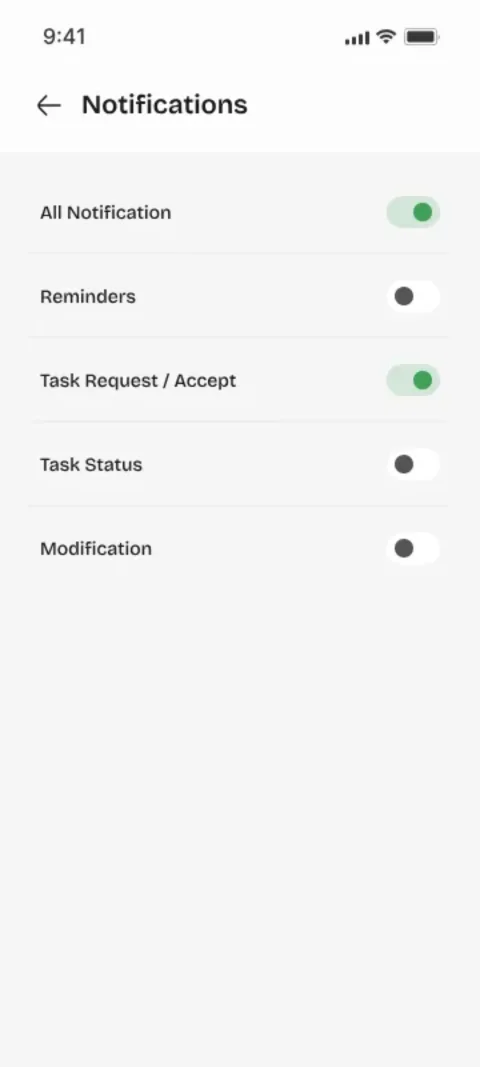
Whenever a task is assigned, accepted, rejected, completed, or edited, you get a notification. If something changed, you'll know — without having to ask.
Plans change, and that's fine. Edit the title, description, date, or time even after sending — the other person sees the update instantly.
Every action on a task is recorded with a timestamp, so weeks later you can still answer: who did what, and when.
Whether you're managing work, coordinating with a partner, or splitting household errands, Youliable keeps it clear and direct.
Built for freelancers, managers, business partners, and anyone who wants simple task management without the complexity of big-team software.
Everything you need for easy task management, work collaboration, and real-time task monitoring.
Every status change — accepted, rejected, completed, edited — shows up instantly for both people.
Get notified the moment something happens on your tasks. No checking, no chasing.
A complete timeline with timestamps, so you always know who did what and when.
One-to-one task handoffs between two people, without team structures to manage.
If you've ever asked "wait — who was supposed to do that?" in a group chat, you already know why this app exists. One person assigns. The other accepts. Nobody's left guessing.
Every task has one clear owner. No confusion about who's responsible — the accept workflow makes it explicit.
Assign tasks directly to any person by name or phone. They accept or decline — no group confusion, no lost messages.
Create and assign a task in under 30 seconds. WhatsApp-level simplicity with real accountability built in.
Track every task from creation to completion. Full timeline, timestamps, and status history — always visible.
You've lived this in a dozen group chats. Here's how it usually goes — and what changes with Youliable.
We kept Youliable deliberately small. No boards, no permissions, no onboarding video — just the six things you'll use every single day.
Tap the +, type a title, done. Description, due date, and priority are optional — because most tasks don't need a form.
Search by name or number and hit send. They get a notification and accept or decline — no CC-ing, no 'did you see my message?'.
Every task keeps a timeline — created, accepted, started, done. Weeks later you can still see exactly what happened and when.
You'll know the moment someone accepts, starts, or finishes. No refreshing, no asking, no 'any update?'.
Plans change. Change the title, push the date, or send it to someone else — as long as it hasn't been accepted yet, it's yours to fix.
Changed your mind? Delete it before it's accepted. Keep your own list tidy — it's your workflow, you're in charge.
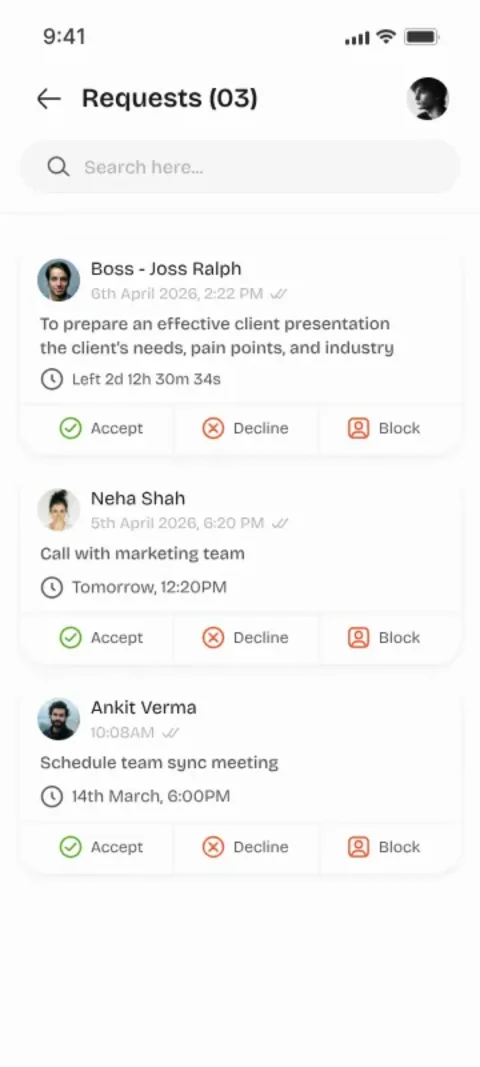
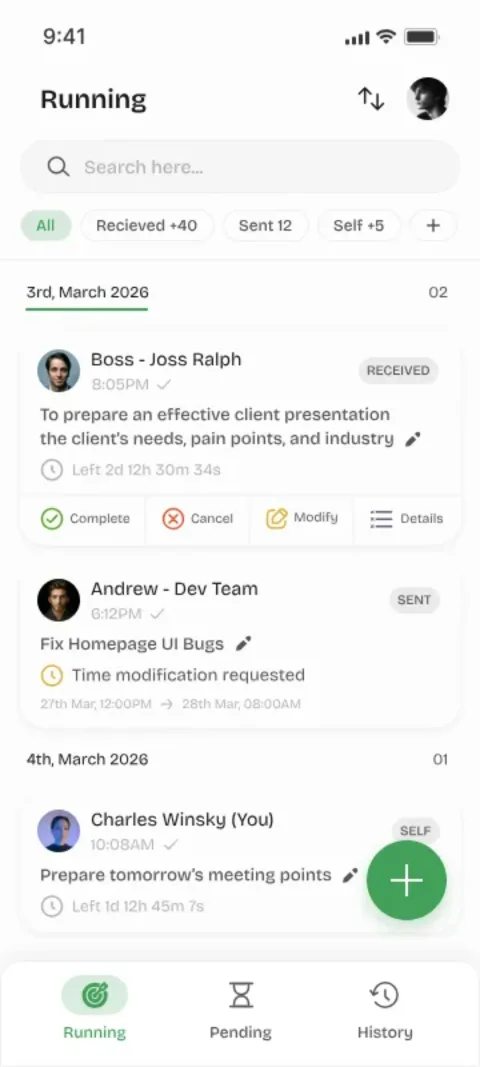
These screenshots are straight from the app you'll install. No concept art, no happy-path fiction — this is exactly what you get.
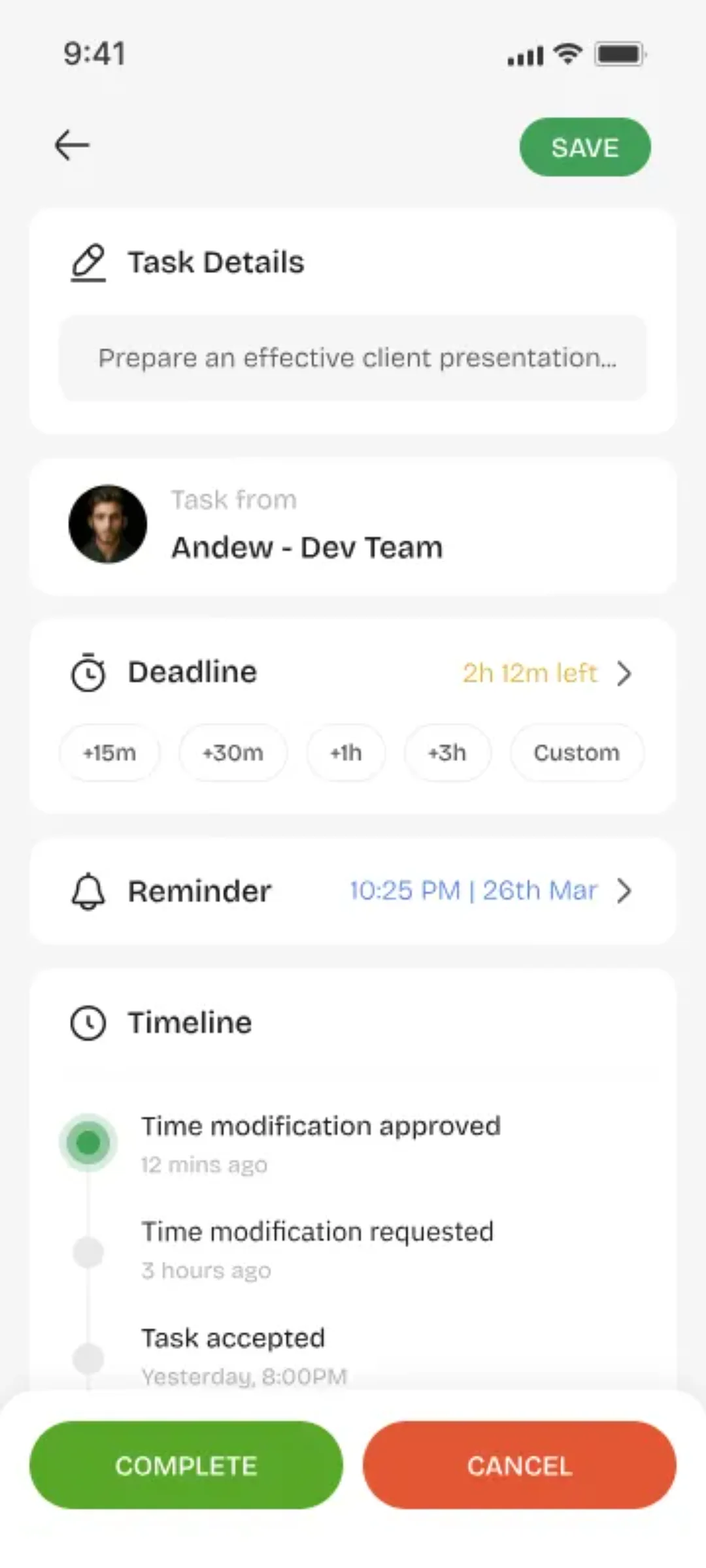
From downloading the app to finishing your first task: six steps, and most people get there in under five minutes. No tutorial required.
Download Youliable and register with your phone number. OTP verification creates your profile automatically in under 2 minutes.
Tap + to create a task. Add a title, optional description, due date, and priority. Done in under 30 seconds.
Search any user by name or phone number and assign the task directly to them. They receive an instant push notification.
The receiver accepts or declines. Accepting creates explicit 1-to-1 ownership — no ambiguity, no excuses.
Real-time push notifications keep both sides in sync — when accepted, when started, and when completed.
Your personal dashboard shows every task you created, assigned, and completed — with full timeline and timestamps.
Complete Flow
Ready to send your first task? It'll take you about two minutes.
Four states. Zero ambiguity. This is what happens after you hit send.
You tap +, type a title, hit send.
Nobody else needs to be in the room. It's out there, owned by you, waiting.
The other person gets a ping and taps Accept.
Now it's theirs. Not 'everyone's'. Not 'someone's'. Theirs.
They work on it. You both see the status move in real time.
No 'any update?' messages. You can just look.
Done. It lands in your timeline with a timestamp.
Proof it happened — without you having to ask.
The whole thing takes under five minutes the first time. After that, it's seconds. That's the whole trick.
We'd rather grow one real user at a time than chase hype. Here's where things stand.
People using Youliable daily
Tasks finished with clear ownership
Global reach across the world
Average rating on app stores
Join the 50,000+ people who stopped chasing updates
Big-team software makes you set up boards, roles, and workflows before you've assigned a single task. Youliable skips the ceremony — it's built for real one-to-one work.
Assign work directly to the right person and track every task in real time — no more chasing for updates.
Manage client work with crystal-clear ownership. Every task has an owner, every deadline is visible.
Coordinate work between partners without group chaos. Accept, reject, or complete — both sides stay in sync.
Share daily responsibilities, errands, and plans with your partner — organized, clear, and done.
Lightweight and easy to use — no training needed. Everyone just starts assigning tasks and getting things done.
Anyone who needs simple, clear task tracking — without the bloat of large-team software.
We didn't write these. Real users told us, in their own words, what changed for them.
"Youliable completely replaced our WhatsApp task chaos. I assign tasks directly to the right person, they accept, and it's done. Nobody can say 'I didn't know'. Our delivery rate went up 40% in the first month."
"The accept/decline workflow is genius. I assign a task directly to one person — not a group — and they own it the moment they accept. No more 'I thought someone else was doing it'."
"We tried Asana, Trello, Jira — all too complex. Youliable is the first tool everyone actually uses every day. Assign a task to a person, they accept, they complete. That's it. Setup took 3 minutes."
"Running a 12-person startup means tasks fly everywhere. With Youliable I assign directly to the right person — not a channel, not a group. They accept and own it. Exactly what we needed."
"The notification system is perfect. When I assign a task to someone, I get notified when they accept, when they start, and when they complete. No more chasing people for updates."
"Task history is incredibly useful. I can see exactly who I assigned what to, when they accepted, and when they completed it. Full visibility without any extra effort from anyone."
Trusted by teams at
Short, honest reads on task management, accountability, and getting things done with other humans. No fluff — we promise.
WhatsApp, Slack, and Teams are great for talking — terrible for remembering. Here's why tasks disappear in chat, and what actually fixes it.
Remote work makes the ownership problem worse. Here's how one simple accept/decline step creates real accountability between two people.
We compared all three across 12 real-world dimensions — ease of use, adoption, and whether tasks actually got finished. The results surprised us.
Download the app, assign one real task to someone, and watch how good it feels when they just accept it and get it done.
Available on iOS and Android · Free forever for small teams